
MInD
In the domain of 3D development, it’s fundamental to recognize that all 3D models are constructed from polygons, with the triangle being the most basic unit. A triangle invariably lies within a specific plane. During the modelling phase, four-sided polygons, or quads, are commonly employed due to their ease of subdivision. While the vertices of quads may not strictly adhere to a single plane, advanced modelling software is designed to maintain coplanarity among the four points. Polygons consisting of arbitrary points can be mixed within a model. Polygons that consist of more than four points are called on. In the final modelling phase, quads and ngons are converted to triangles.

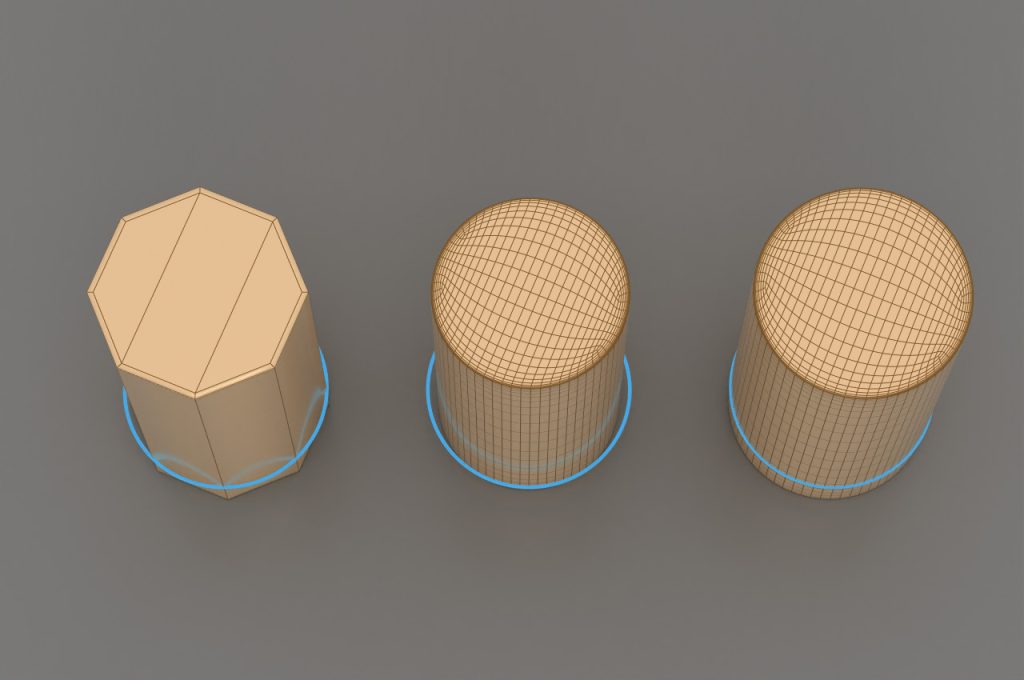
Three side polygons, quads, combined, ngon cylinder top
The more polygons a model is made up of, the more details it can have, but the more expensive and slower it is to display. In this regard, we use high poly and low poly models. Which group covers how many polygon numbers is always determined during the planning of the given project. The further the camera is from the object, the lower resolution is sufficient. In many cases, several versions of the same model are made with different polygon numbers, and in terms of distance from the camera, the model that is still of adequate quality is always visible. This is called Level of Detail (LOD).

Top: low-poly [ 2672 polygons], bottom: hi-poly [ 42752 polygons]
Development of a control shape of the object, and manual creation of a low-poly model.
Creating the rig, for the model so it can be animated later
UV mapping first phase, where a 2D image is projected onto the 3-dimension object.
The following process must be performed with multiple iterations until the desired result is achieved. The process must be procedural, and non-destructive.
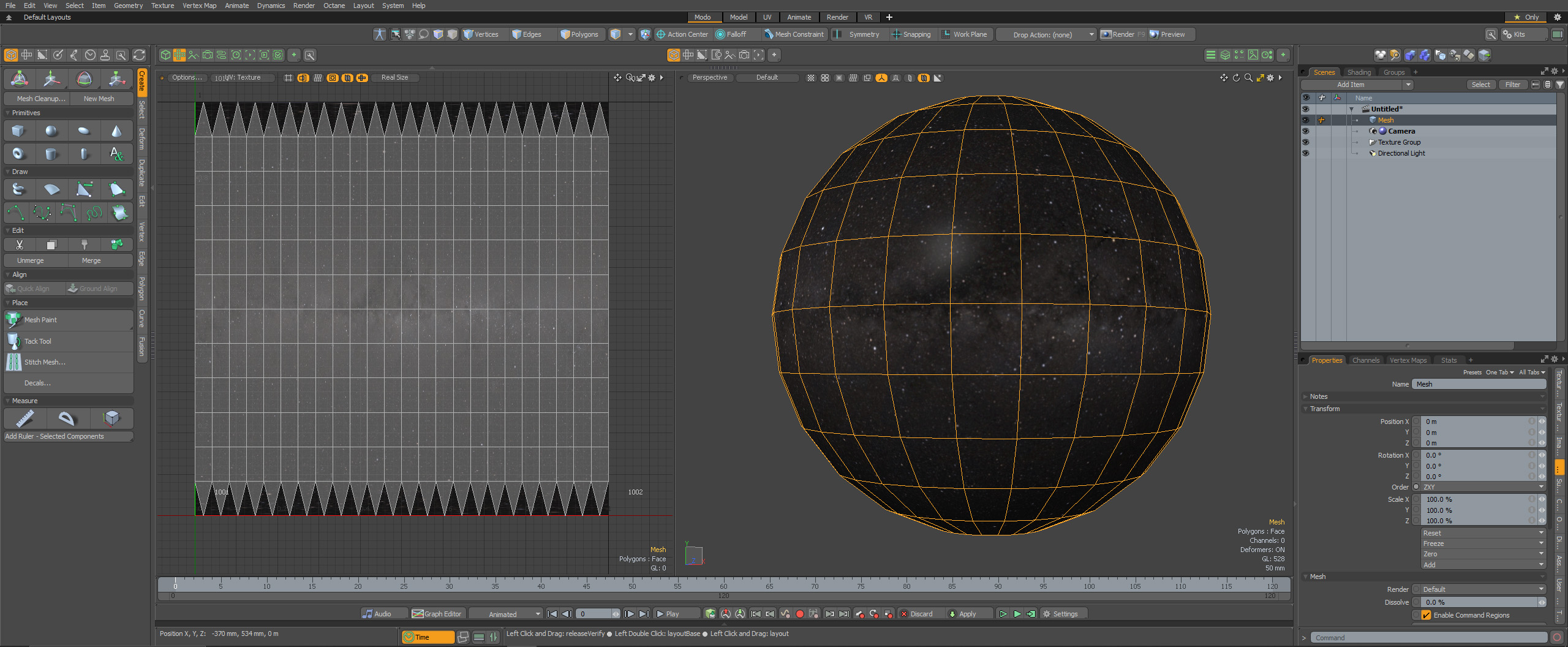
The image below shows the UV mapping of a sphere in Foundry Modo, where the polygons from the 3D sphere object are flattened into a 2D shape
Bake to a high-polygon model containing the final detailed result, with separated connected topology. At this point, the model has all the details in the polygon topology.
Bake normal map and vector displacement map which include the extra small details. With this technique, a low poly number model is created from the high poly number model and the details are transferred to a 2-dimensional image, where the RGB components correspond to the X, Y, and Z coordinates, respectively, of the surface normal.
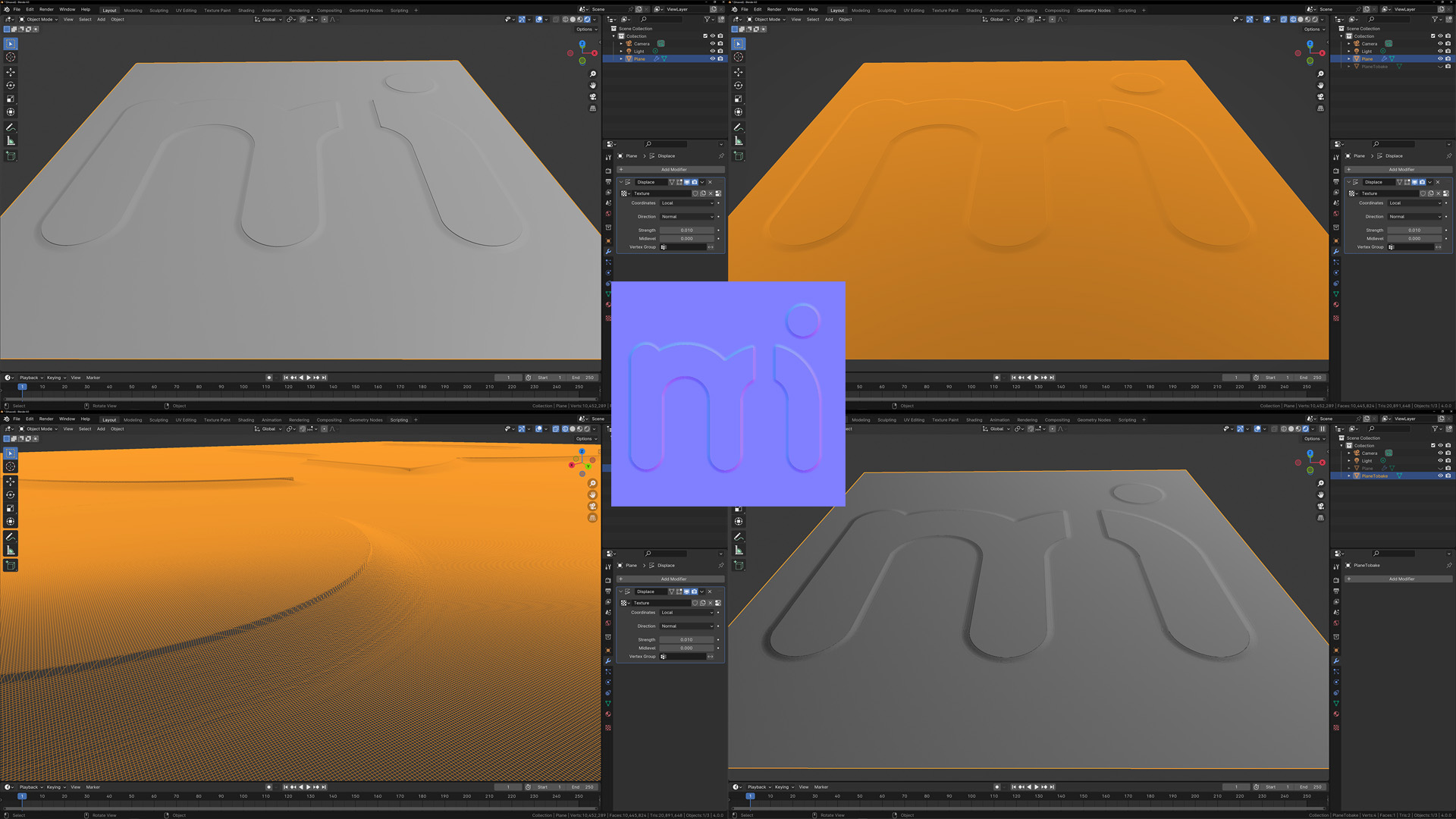
Top left: hi-poly shaded (2.6M polygons), top right: hi-poly wireframe, bottom left: hi-poly wireframe close, bottom right: lo-poly shaded (1 polygon), center: baked normal map
The rigid body simulation enables the emulation of the movement of solid entities, influencing both the position and orientation of objects without inducing deformation.

Bone setup with inverse kinematics in Maya
The material must be PBR material (Physically Based Rendering) [or sometimes called PBM, physically based material] which accurately simulates any physical material from the real world. The material consists of several different textures, thus ensuring perfect lifelikeness.
Base Color, that defines the overall color of the object.

Metallic to define is the surface metal or not. Although this is a numerical value and you can set the possibility that a given model is half metallic and half non-metallic, in the real world an object is either metallic or not. In the image below, the metallic value changes from 0 to 1.


Specular to control how much light to reflect. In reality, non-metallic materials reflect a maximum of 8% of light. Anisotropy strength and rotation also can be set.

Displacement map to change the geometry position. The texture grayscale value physically changes the geometry at render time along the normal.

Normal map to fake the lighting of bumps. The normal map does not change the geometry, it only creates the illusion of it. It is an RGB image where each color channel represents the vector direction. Unlike displacement, it is an extremely fast operation.

Clear coat to use dual normals, to add a secondary specular layer which gives the impression that there is still some coating on the material

Emissive to control self illumination

Transparency to see through an object. Transparent objects can have different Index of Refraction (IOR) and also can be rough (last ball)

Vector displacement maps are 32-bit images storing three-dimensional geometric information. Similar to the traditional displacement maps but instead of moving points only along the normal vector they can shift each point in all three dimensions.

Defining a material in 3D software is mostly physics and a little art.
From the point of view of the definition of 3d material, a naturally occurring material belongs to one of the following three groups
Dielectric materials are non-metals, and their specular reflection is about 2-8%, usually 4%. These are wood, glass, stone, etc.
Semiconductor materials have about 8-40% specular reflection, and these are rarely used materials like germanium, diamond, etc.
Metals have 40+% specular reflection, and they are like gold, steel, copper, etc.
Dielectric Materials have Index of refraction (IOR) for specular reflection. This value also sets the refraction for transmissive materials. Metallic materials have a metalness value where the surface behaves like a metal, using fully specular reflection and complex fresnel.
The IOR list of materials can be found at https://pixelandpoly.com/ior.html
Determining the color of Dielectric materials is a relatively simple task, with one or more samples and some Saturation and Brightness adjustments (this is the art part) the desired color value can be specified quite well.
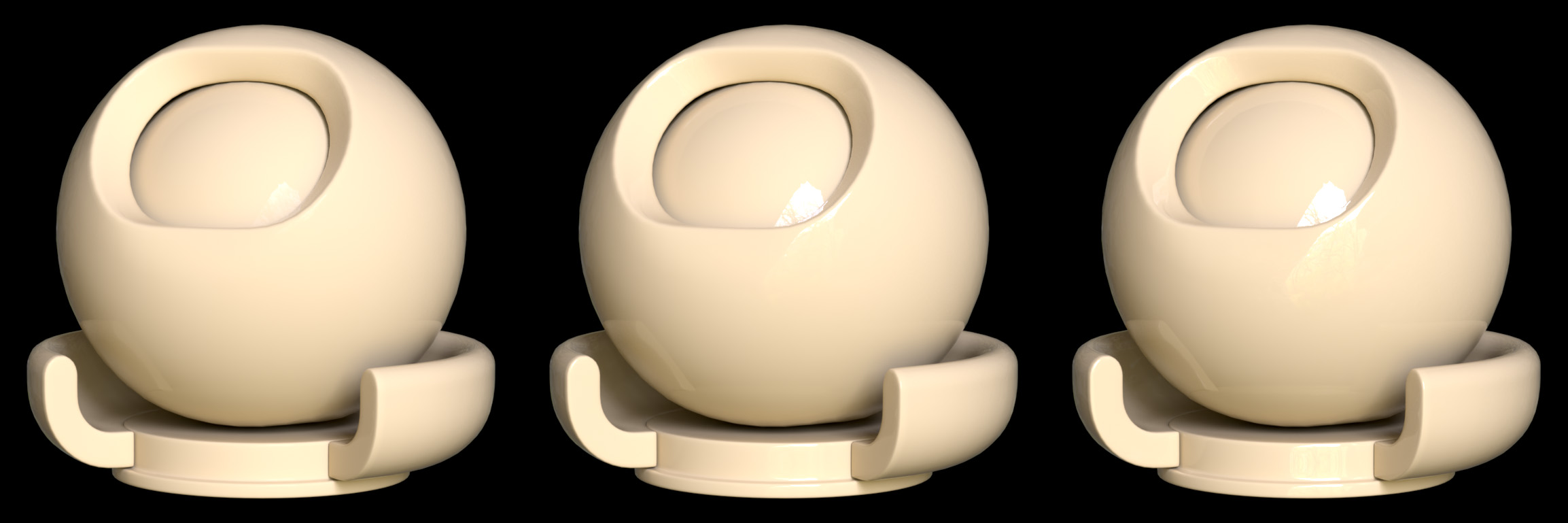
The image below shows a material with color code #F4BC64 and IOR values of 1.1, 1.3, 1.5 from left to right. As the IOR increases, the reflection of the material also increases.
3D programs provide a value for setting metallic materials. A value between 0 and 1 can be specified, but in nature, a material is either a metal or not, so actually only the values 0 and 1 make sense. The color of the metal must be set, which cannot be solved by simple sampling since the metallic material reflects everything. The fact that the surface roughness washes it all away makes the task even more difficult.
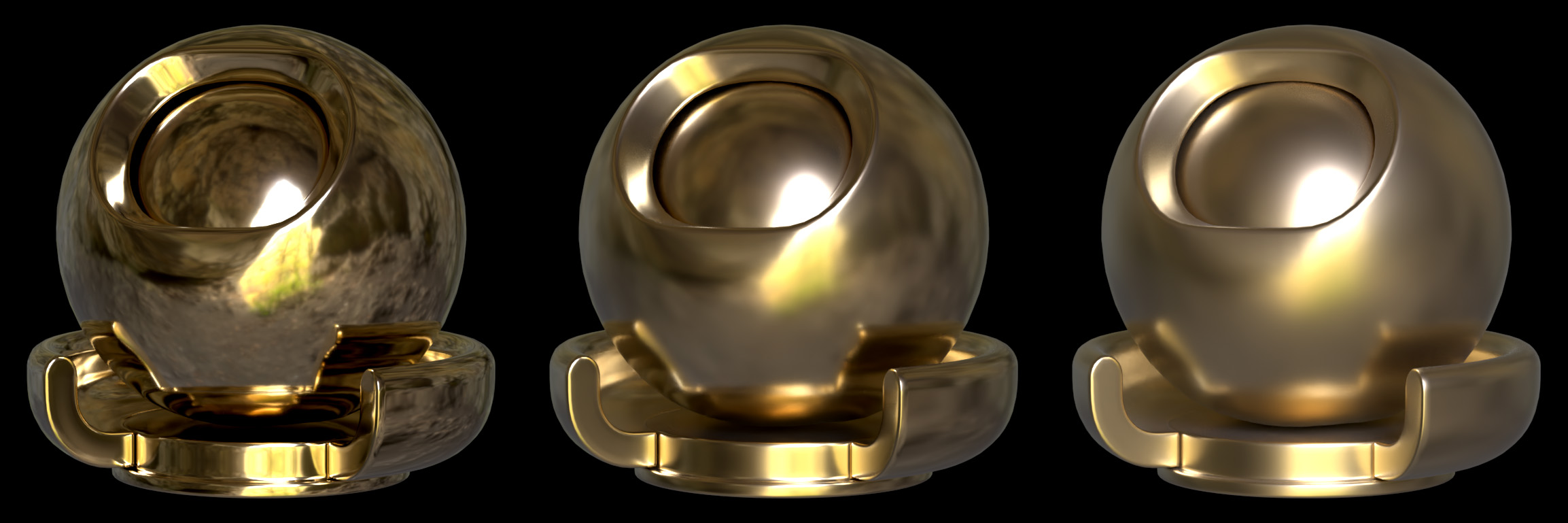
In the image below, the metallic value is set to 1. It contains the same #F4BC64 color value as the previous dielectric material. The surface roughness increases from left to right, washing out the reflection more and more.
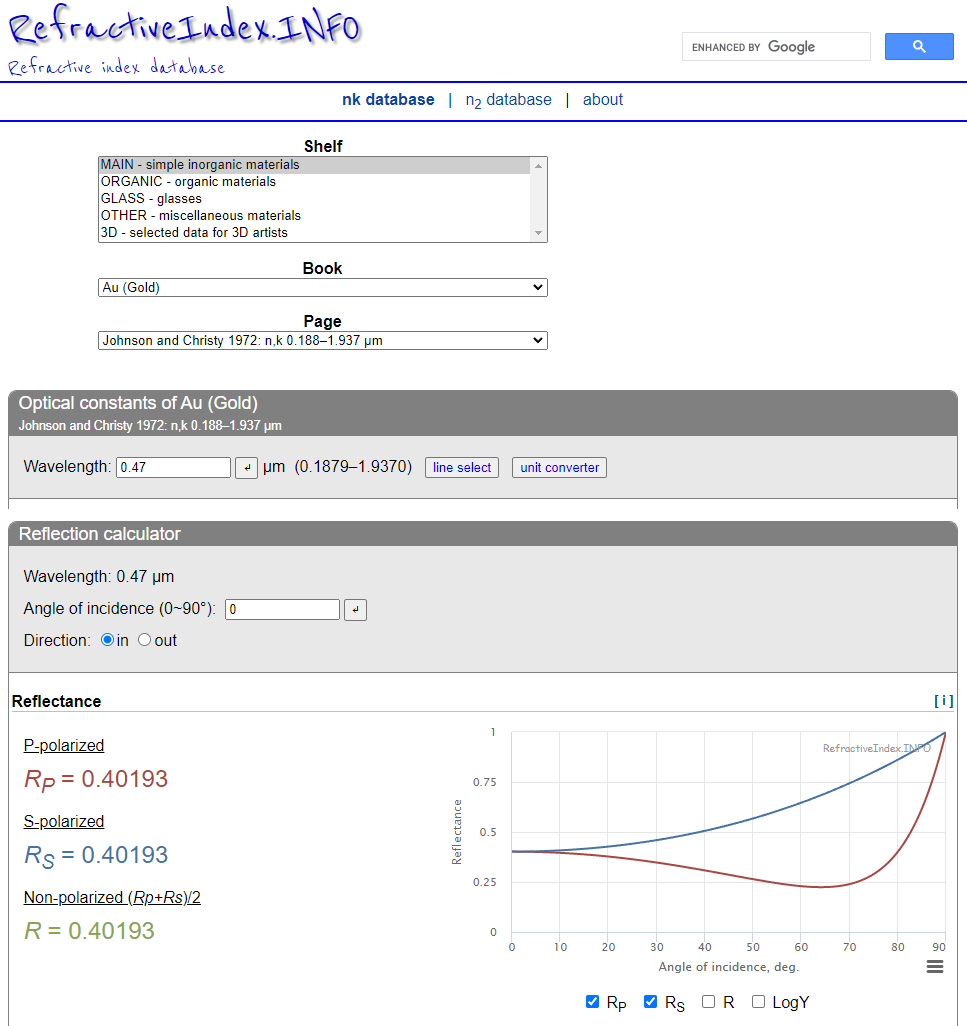
To determine the color of the metal, use https://refractiveindex.info/ website. The first step is to select the desired material (in this case, gold). Individual values of RGB can be obtained as the value of Non-polarized reflectance by specifying the appropriate wavelength.
The image below shows the reflectance value for the blue color at 470 nanometers. In 3D software, the color value can also be entered as a floating point number. In this case, the blue value for gold is 0.40193. This must be repeated for the red and green color with the correct red and green light wavelength.
Anisotropy and surface displacement are important factors in the representation of the material. This is not only a characteristic of metallic materials, dielectric materials also have these properties.
Anisotropy is a property of direction dependence, which results in different properties in different directions. This means reflections on rough surfaces.
Displacement means changing the surface of the material in the direction of a given vector.
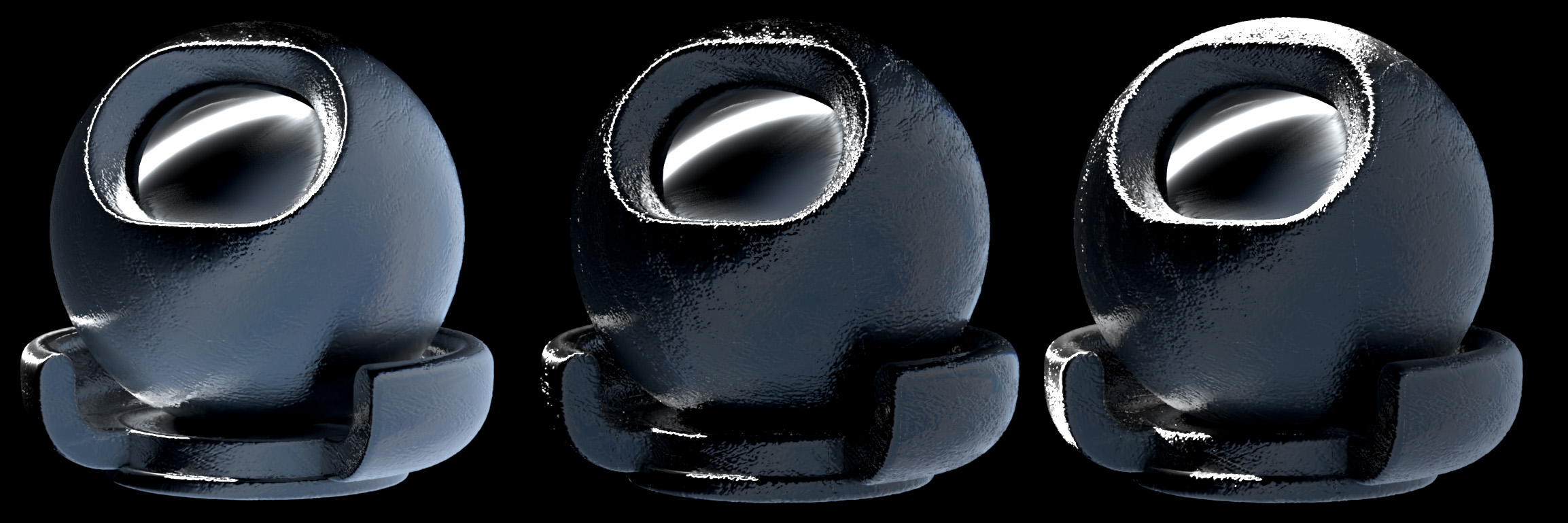
The image below shows a titanium alloy, from left to right, without anisotropy, with anisotropy, and with surface displacement.

Finally, coating (ClearCoat) is a method to add an extra reflective layer to the material. The strength and the roughness can be set just like the tinting color and anisotropy.
The image below shows the original image, a coat without roughness and a coat with roughness
In the 3D world, a scene is a document to describe what to render. The scene is constructed separately both offline and in real-time rendering software. The various setting parameters are changed until the final render in the two programs matches.
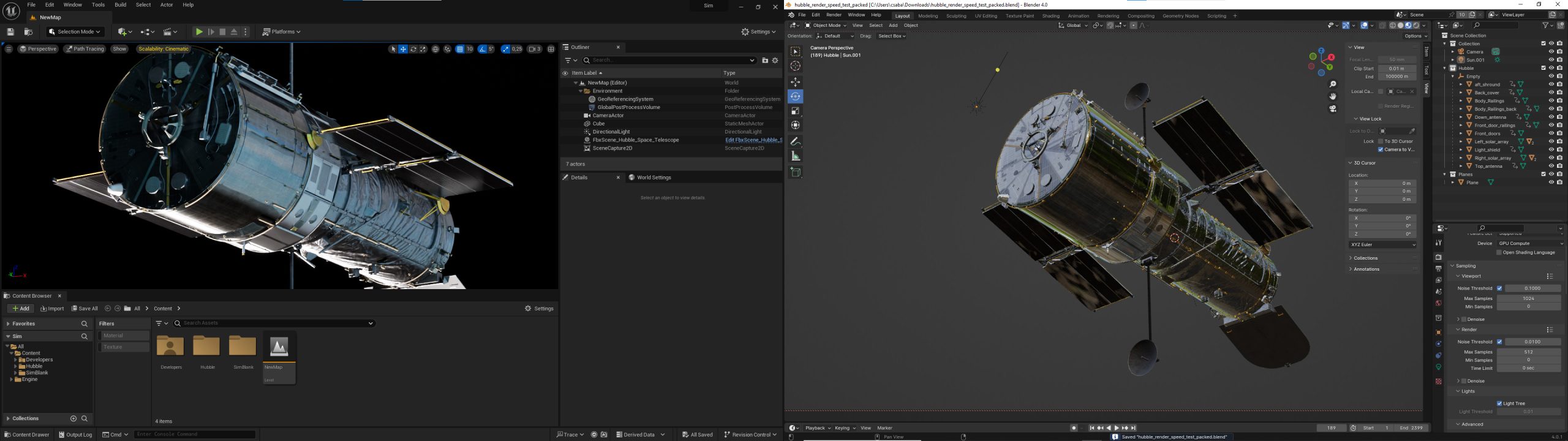
Left side the real-time Unreal engine editor, right side Blender offline modeler and renderer

Render setup in SideFX Houdini
A method that can produce high-quality images, but unlike offline rendering, an image is created here in a fraction of a second, usually in a few milliseconds. The rendering speed is greatly influenced by the video card in the machine, the GPU. There are 2 types, rasterization and ray-trace. The latter only works with the right hardware, and we use it for this task because of the lifelike reflections and lighting. Another good NVidia option is DLSS, the usability of which we will test.

Unreal engine with the scene editor (left side) and the level BluePrint editor (right side)

Example image, Earth rendered in Planetside Terragen, Hubble rendered in Blender, Composed with OpenCV
1. Hubble telescope model:
TurboSquid. (n.d.). 3D Hubble Space Telescope model. Retrieved from https://www.turbosquid.com/3d-models/3d-hubble-space-telescope-model-1143468
2. Milky way texture:
Blender Artists Community. (n.d.). High Resolution Milky Way HDRI or Background Image – Willing to Pay. Retrieved from https://blenderartists.org/t/high-resolution-milky-way-hdri-or-background-image-willing-to-pay/1176021
3. UV grid texture:
Blender Artists Community. (n.d.). Best way to unwrap a sphere?. Retrieved from https://blenderartists.org/t/best-way-to-unwrap-a-sphere/614600
4. Normal map textures – Learn OpenGL:
Overvoorde, J. (n.d.). Advanced Lighting: Normal Mapping. Retrieved from https://learnopengl.com/Advanced-Lighting/Normal-Mapping
5. Normal map textures – Pinterest:
Pinterest. (n.d.). [Normalmap Texture Pin]. Retrieved from
https://www.pinterest.com/pin/239042692702728344/
6. Normal map textures – Planet Pixel Emporium:
Planet Pixel Emporium. (n.d.). Normal Mapping Tutorial. Retrieved from https://planetpixelemporium.com/tutorialpages/normal2.html
7. Normal map textures – OpenGameArt:
OpenGameArt. (n.d.). Various normal map patterns. Retrieved from https://opengameart.org/content/various-normal-map-patterns-image0011png
8. Normal map textures – Brandon’s Drawings:
Brandon’s Drawings. (n.d.). Normalmaps. Retrieved from https://brandonsdrawings.com/normalmaps/
9. Vector displacement textures:
Schumacher, M. (n.d.). Vector Displacement Textures. Retrieved from https://mschumacher.gumroad.com/l/DkHCV
10. ISS model:
NASA. (n.d.). International Space Station 3D Model. Retrieved from https://science.nasa.gov/resource/international-space-station-3d-model/
11. Airplane model:
Unreal Engine Marketplace. (n.d.). Commercial Long Range Aircraft. Retrieved from https://www.unrealengine.com/marketplace/en-US/product/commercial-long-range-aircraft
12. Airplane background image:
HDRI Haven. (n.d.). Wasteland Sunset Sky Dome. Retrieved from https://hdri-haven.com/hdri/wasteland-sunset-sky-dome
13. Earth background image from YouTube:
@RelaxationWindows. (n.d.). Earth from Space & Space Wind Audio. Retrieved from https://youtu.be/wnhvanMdx4s?t=11602
14. Earth textures for Planetside Terragen:
NASA Visible Earth. (n.d.). Blue Marble Collection. Retrieved from https://visibleearth.nasa.gov/collection/1484/blue-marble
15. Shading Theory with Karma
SideFX. (n.d.). Shading Theory with Karma. Retrieved from https://www.sidefx.com/tutorials/shading-theory-with-karma
Copyright © 2023 Machine Intelligence Zrt.
| Cookie | Duration | Description |
|---|---|---|
| cookielawinfo-checkbox-analytics | 11 months | This cookie is set by GDPR Cookie Consent plugin. The cookie is used to store the user consent for the cookies in the category "Analytics". |
| cookielawinfo-checkbox-functional | 11 months | The cookie is set by GDPR cookie consent to record the user consent for the cookies in the category "Functional". |
| cookielawinfo-checkbox-necessary | 11 months | This cookie is set by GDPR Cookie Consent plugin. The cookies is used to store the user consent for the cookies in the category "Necessary". |
| cookielawinfo-checkbox-others | 11 months | This cookie is set by GDPR Cookie Consent plugin. The cookie is used to store the user consent for the cookies in the category "Other. |
| cookielawinfo-checkbox-performance | 11 months | This cookie is set by GDPR Cookie Consent plugin. The cookie is used to store the user consent for the cookies in the category "Performance". |
| viewed_cookie_policy | 11 months | The cookie is set by the GDPR Cookie Consent plugin and is used to store whether or not user has consented to the use of cookies. It does not store any personal data. |

